
Nintendo account security is primarily account and payment security, with added risk when family settings and child profiles are linked.
Practical defense is straightforward: secure the controlling email, enforce unique credentials, and reduce unauthorized purchase paths.
Baseline protections
- Secure the email account that receives Nintendo password reset emails.
- Use a unique password stored in a password manager.
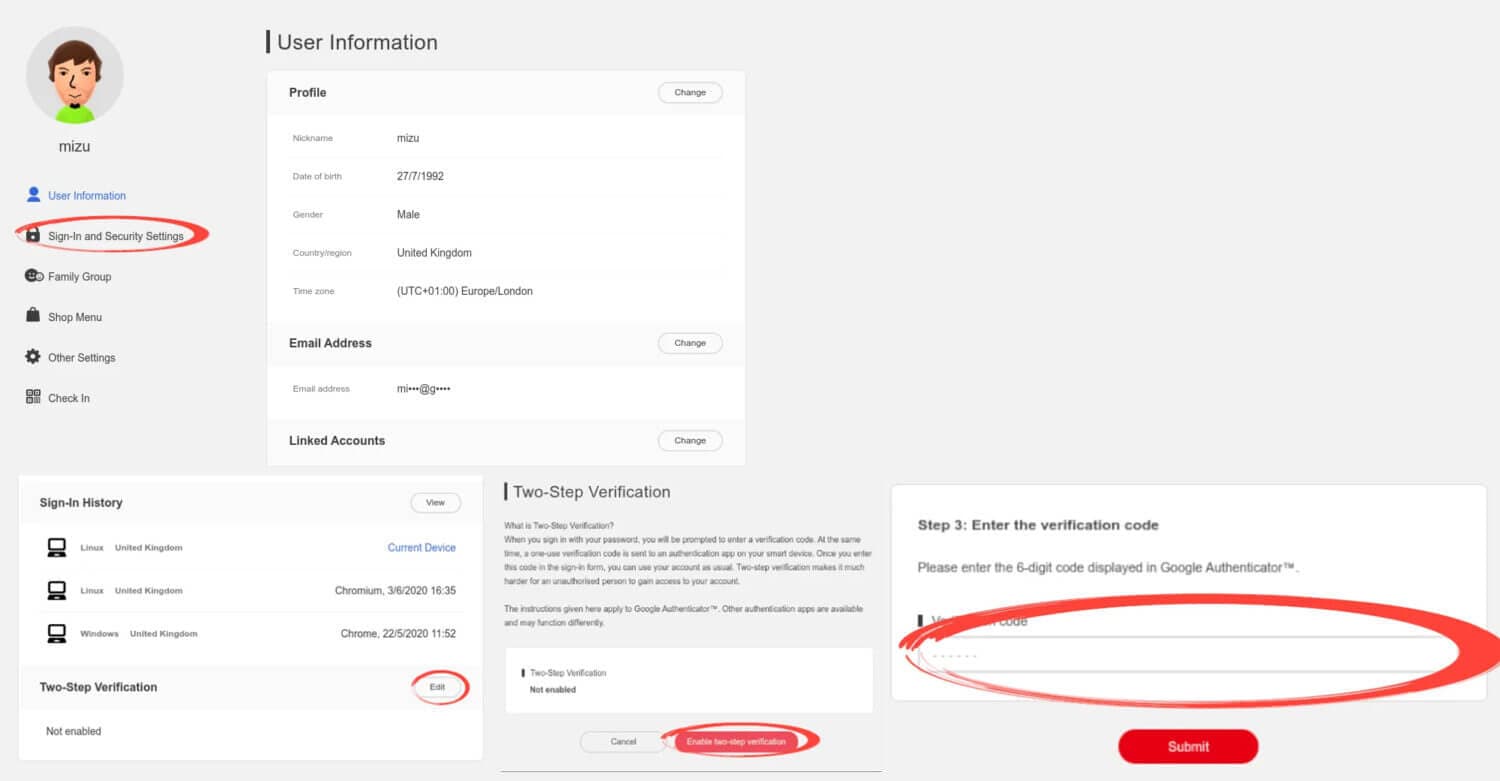
- Enable two-factor authentication (2FA) where available and store backup codes safely.
- Review signed-in devices and active sessions, and remove anything you do not recognize.
- Lock down spending: require approval for purchases and remove saved payment methods where possible.
Key idea: The control plane is your email inbox and phone number, not the console. If the attacker controls resets, they control the account.
The common Nintendo Account takeover patterns
| Pattern | What it looks like | Defense that changes outcomes |
|---|---|---|
| Password reuse | A leaked password works on your Nintendo Account | Unique password in a manager |
| Phishing | Fake “support” messages and login pages | Use official paths and verify before logging in |
| Email compromise | Attacker resets your password through email access | Secure email first with strong authentication |
| Spending abuse | Unauthorized purchases or subscriptions | Purchase approval and payment hygiene |
Step 1: Secure the email account used for Nintendo
Email is the reset channel for most services. If your email account is weak, every other security step becomes fragile. Start with a unique email password, strong authentication, and a quick review of recovery options and signed-in devices.
Step 2: Use a unique password and stop reuse
Password reuse is still the fastest path to takeover. A password manager removes the main excuse for reuse: memory. Use a strong unique password and store it in a manager.
Related: Common mistakes when creating passwords.
Step 3: Turn on strong authentication and protect recovery
2FA reduces the chance that a stolen password is enough. Recovery is part of security, though. Store backup codes safely, and keep recovery information current so you do not lock yourself out.
Common mistake: Turning on 2FA, then losing the second factor and losing the account. Backup codes and a recovery plan prevent self-lockout.
Step 4: Audit devices, sessions, and linked access
If you see unexpected logins, new devices, or changes you did not make, treat it as a signal. Remove unknown sessions, change passwords from a trusted device, and re-check recovery options.
Step 5: Lock down spending and family settings
If a payment method is attached, unauthorized purchases can become the fastest “damage” outcome even when the attacker cannot keep the account. Use purchase approvals and remove saved payment methods from child profiles and shared devices.
If kids use the account, treat chat and contact surfaces as a separate risk track. Console-specific defaults help: How to use parental controls for video game consoles.
If you suspect the account is compromised
Start with containment steps that prevent repeat access:
- Change the email password first, then the Nintendo Account password, from a trusted device.
- Remove unknown sessions and devices.
- Review purchases and subscriptions and document anything unauthorized.
General workflow: Been hacked? What to do first.
Nintendo Account security becomes straightforward when you focus on the control plane and spending risk. Secure email, stop password reuse, add strong authentication, and tighten purchase defaults. That combination prevents most takeovers and makes recovery calmer.
If something still goes wrong, the same model helps you respond: contain access, rotate credentials, and rebuild trust in the account. The goal is not perfect safety. The goal is short recovery time and fewer high-cost mistakes.
Once you have that baseline, the platform’s UI changes matter less. Your posture is built on durable controls, and those controls outlast menu labels.