
Travel changes your security posture because your routines break. You use new networks, you carry devices through crowded spaces, and you may be forced to rely on SMS, hotel Wi-Fi, or public chargers. The fix is not paranoia. It is a short, phased playbook that hardens the control plane before you leave and reduces exposure while you move.
| Phase | What to prioritize | Why it matters |
|---|---|---|
| Before you leave | Secure email, password manager, and device lock | Those are the recovery channels if a phone is lost or an account is phished |
| While traveling | Network hygiene and physical control | Most travel incidents are opportunistic and depend on convenience shortcuts |
| After you return | Session cleanup and audit | Travel is when long-lived sessions and saved credentials get exposed |
Rule of thumb: if you cannot recover your primary email account quickly from a lost phone, you do not have travel readiness. Fix that first.
Start with the control plane
People worry about hotel Wi-Fi and forget the control plane. The control plane is the set of accounts that can reset everything else: primary email, Apple ID/Google account, password manager, and any financial logins.
- Enable stronger sign-in on your primary email and password manager (prefer passkeys or security keys where available).
- Confirm recovery methods are current and owned (backup email, phone number, recovery codes stored offline).
- Turn on login alerts for high-value accounts.
If you want the broad containment sequence for account incidents, keep this handy: been hacked.
Before you leave: a 30-minute hardening checklist
Update and restart
Patch before you travel. Updates are boring, but travel is when you are most likely to accept weird prompts or install "help" apps.
- Update OS and browser on your phone and laptop.
- Update your authenticator apps and password manager.
- Restart devices after updates so you are not debugging a half-installed patch on airport Wi-Fi.
Reduce what you carry
Less data reduces leverage. If you do not need access to a vault, a document store, or an admin panel, consider signing out before travel. If you are traveling for sensitive work, consider using a dedicated travel device or a separate browser profile with minimal saved credentials.
Back up the essentials
Travel failures are often "lost phone" problems, not "elite hacker" problems. If your phone disappears, you need recovery paths.
- Back up photos and critical documents.
- Store backup codes and recovery info offline, not in the same device you are carrying.
- Make sure you can sign in to your email and password manager from a second device.
Turn off automatic connections
Disable auto-join for Wi-Fi networks you do not fully control. Auto-join is convenient and exploitable because it makes you connect before you think.
While traveling: reduce the two main travel risks
Travel security is mostly about two risks: untrusted networks and physical device exposure.
Untrusted networks
Public Wi-Fi is not always malicious, but it is rarely managed for your safety. Prefer your cellular hotspot when possible. When you must use Wi-Fi:
- Use HTTPS sites only and avoid sensitive logins on unknown networks if you can postpone.
- Confirm the network name with staff. Attackers set up lookalike SSIDs in airports and hotels.
- Use a VPN as an additional layer on untrusted networks, but do not treat it as anonymity or a magic shield.
CISA’s travel guidance covers Wi-Fi and device hygiene in a practical way: Holiday traveling with personal internet-enabled devices.
Physical exposure and shoulder-surfing
In crowded spaces, attackers do not need to hack you if they can watch you. Protect PIN entry, avoid discussing sensitive details in public, and do not unlock devices for strangers offering "help" at kiosks or charging stations.
Safety note: if someone pressures you to install an app, scan a QR code, or "confirm" a login because you are traveling, pause. Travel is a prime time for social-engineering because you are distracted.
Bluetooth and proximity features
Bluetooth is useful for headphones and car connections, but it also expands your surface area. If you are not using it, turn it off. Also disable device discoverability where possible.
Charging and USB ports
Public charging is mostly a convenience risk and a physical tampering risk. The simplest safe habit is to use your own charger and a wall outlet. If you must use USB ports, consider a charge-only cable or data blocker. Avoid plugging unknown USB drives into your laptop.
Account protection that matters when you lose a phone
Most travel account loss stories look like this: phone is lost, the victim cannot access email, and SMS-based recovery fails in a foreign country. Avoid that pattern.
- Prefer app-based authentication or passkeys over SMS when possible.
- Keep a second recovery factor available (backup email, security key, offline recovery codes).
- Protect your phone number with a carrier account PIN where possible, because SIM swaps can break SMS recovery.
Financial safety is part of travel security
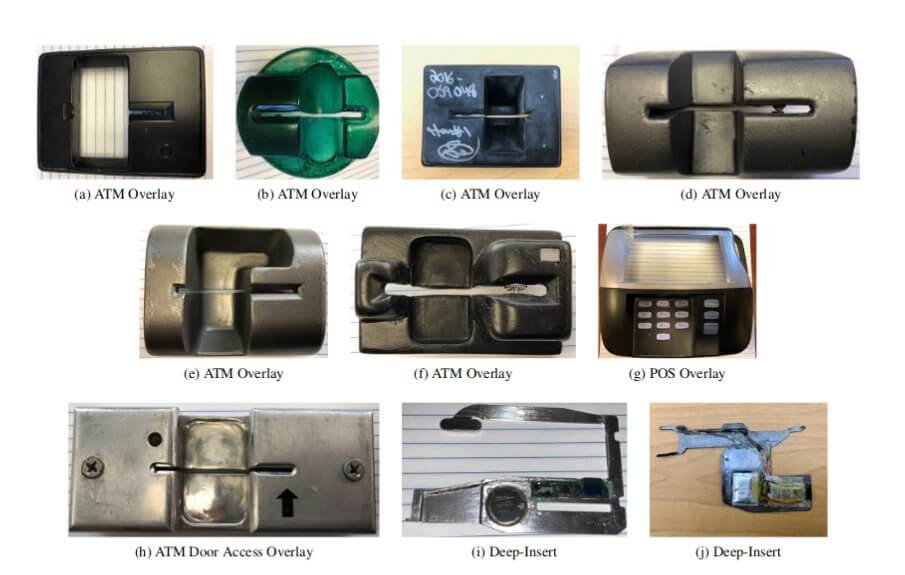
Card skimming and payment fraud are not "hacking" in the narrow sense, but they are common travel losses. Basic habits reduce it:
- Use bank-owned ATMs when possible.
- Cover the keypad, and avoid machines that look tampered with or unusually loose.
- Use card alerts and review transactions daily while traveling.
After you return: clean up the travel footprint
Travel is when you accept new logins and keep them. After you return, do a short audit to remove leftover exposure.
- Forget Wi-Fi networks you do not need anymore.
- Review recent account activity for major services (email, social, banking) and sign out of sessions you do not recognize.
- Rotate passwords if you logged into accounts from shared devices or if you suspect phishing.
- Remove any apps you installed only for travel (ride-share clones, "airport" apps, random VPNs).
If you suspect your phone was tampered with, start with how to check if your phone is hacked.
Travel security is not a separate discipline. It is normal security under worse conditions: less time, more distraction, more untrusted infrastructure. The way to win is to harden recovery before you leave and to reduce exposure while you move.
When the control plane is strong, travel stops being a special risk category and becomes a series of manageable tradeoffs.
The goal is not to eliminate risk. It is to make sure a lost phone, a fake Wi-Fi network, or a rushed login cannot turn into a week of lockouts and financial damage.
A "lost phone" response plan (write it before you need it)
Travel is when loss and theft are most likely. A phone loss is not only a hardware problem. It is an identity problem because the device often holds email access, authentication apps, and saved sessions.
| If your phone is lost or stolen | Do this | Why |
|---|---|---|
| Immediately | Use Find My / device manager to mark it lost and attempt remote lock. | Reduces opportunistic access and buys time. |
| As soon as you can | Change your primary email password from a different, trusted device. | Email is the reset surface for most accounts. |
| Same day | Revoke sessions on email, social, and financial accounts and remove the device from trusted devices lists. | Stolen sessions can persist even after a password change. |
| Same day | Contact your carrier if you suspect SIM swap or if your number suddenly stops working. | Protects SMS-based recovery and reduces number takeover risk. |
This is where recovery planning pays off. If you do not have a second factor available (security key, backup codes, secondary device), a lost phone becomes a lockout event.
Do not: accept "help" from strangers who offer to "unlock" your device or "recover" accounts. Travel theft often comes with follow-on social engineering.
Device controls that matter more than a VPN
People over-invest in network tools and under-invest in device controls. On the road, physical access is a bigger risk than remote exploitation.
- Strong screen lock: long PIN or passcode, not a 4-digit code. Disable lock-screen previews for sensitive apps.
- Encryption: modern phones encrypt by default when locked. Keep it locked.
- Auto-lock: shorten the time before the device locks.
- Remote wipe enabled: make sure it is set up before travel.
If you travel for business or manage admin accounts
Travel is when privileged access gets exposed. If you have admin access to email, cloud, ads, or financial systems, treat travel like you would treat incident conditions.
- Use separate admin accounts from daily accounts. Do not browse and read email on the same identity that can reset production systems.
- Prefer phishing-resistant authentication for admin access and avoid approving prompts while distracted.
- Use a dedicated browser profile for admin work and keep it free of random extensions.
Public computers and shared devices
Hotel business centers and borrowed laptops are a high-risk place to sign in. If you must use them, reduce the damage if the device is compromised.
- Avoid logging into primary email or password manager on shared devices.
- If you must access an account, use a one-time session, then sign out and revoke sessions from your own device later.
- Do not save passwords and do not accept "remember this device" prompts.
Border and local-law differences
Device inspection rules and legal constraints vary by country. Some travelers choose to minimize data on devices and rely on remote access after crossing borders. If you travel to locations with higher risk or legal complexity, plan ahead and consider carrying less data rather than trying to improvise.
A small after-action review that keeps you safer next time
The most useful travel security improvement is to learn from friction. After a trip, ask:
- Which logins did you struggle with because the factor was tied to one device?
- Which accounts forced you to use SMS because you never upgraded authentication?
- Which apps and services you used were "temporary" but ended up holding real data?
Fixing those issues once turns travel from a fragile state into a durable state.
Travel security is mostly boring hygiene executed under worse conditions. When your recovery lanes are strong and your devices are locked down, most travel attacks degrade into noise rather than incidents.
That is the real objective: a trip where you can lose a device or touch an untrusted network and still keep control of the accounts that matter.